I received my new HTC Thunderbolt in the mail last Thursday after I was having issues with the 4G Radio signal. Shortly after I got off the phone with Verizon, the signal came back to 4G instead of 1X. I decided to keep the replacement phone order in progress since I thought it’d be nice to have a “new” phone with no scratches. I won’t drop this new phone! It’s my goal to keep it in perfect condition.
Anyways, I got a bug in me this weekend to try and root my HTC Thunerbolt following the steps I found on Thunderboltforums.com (I can’t find the exact link, but some instructions I’m finding online are a lot more complicated then what I actually did). I really just had to run this small .exe/.bat file and it was pretty straight forward from there. I didn’t have to copy and paste any commands in the command prompt, etc.
My phone would be wiped clean (which I was fine with since I just got the new one in the mail) but the SD card was fine and all my files remained in tact. My Thunderbolt was wiped clean and then I had to go through the whole process again and finally after that, I was rooted.
I went a step further and downloaded ROM Manager from the Android Market and I was able to download BAMF 2.1 (which is a Gingerbread ROM). I’ve never installed a custom ROM before. I did read online that my radio signal would be lost but WiFi would still turn on and work. To get the cell radio to work again, it was only about a 5 minute fix. I had to download a file that was about 26MB in file size and place it on my SD card. Once that was done, I had to restart my HTC Thunderbolt and press the power button while I held down the volume down button to boot in recovery mode. The 26MB file I placed on the SD card ran an install/update and once I turned the phone back on, I had 4G service again and I was able to make calls 
After I installed BAMF 2.1 (Gingerbread ROM) I felt like my HTC Thunderbolt was a brand new phone! I don’t know why I haven’t tried to install custom ROMs before! They get rid of all the bloatware that come on the phones such as Blockbuster, Golf, Verizon crapware, etc. I feel like I have a true “Android” phone now. The Thunderbolt is snappy and so responsive! I was even able to overclock my phone to 1.2Ghz. I tried 1.4Ghz, but the phone would sometimes freeze up and crash. 1.2Ghz has been very stable for me, so far.
My two favorite things with Das BAMF 2.1 is the new lock screen and NetFlix. On the lock screen (see below): 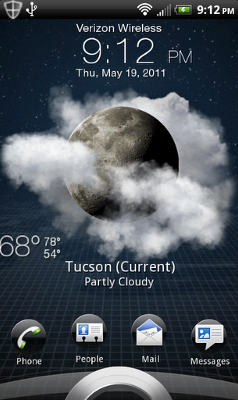
I’m able to see the weather along with easy access to 4 applications/functions of my choice. How this works (look at the picture for reference) is if I want to easily get to my text messages I go to the “messages” icon and drag it into the circle on the very bottom of the screen. The phone will then unlock and go directly to my text messages. If I simply want to just unlock the phone to my main screen, I just take the circle and drag it up into the middle of the screen.
This is so handy because when I’m texting back and forth with friends, I don’t have to unlock the phone, find my text message app / or drag the notification bar down and then tap the message to finally open the message. Having this easy access option on the lock screen saves quite a bit of time over the length of a conversation. Another awesome feature is if you get a text message, it will give you a preview on the lock screen. There’s no easy way to get the text message off the screen though (at least not that I can find) so if the message just says “k” it seems pointless to have to open the text messages and read the message just to get it off the lock screen. If someone knows how to do this, or of the Das BAMF team is going to fix this, that’d be great!
The next thing I’m really excited about, as I mentioned earlier, is NetFlix support! I no longer have Comcast cable anymore. I strictly use NetFlix and Hulu now for my cable. I’ve cut the cord! So there are a lot of TV shows I’ve been watching between the two and I can finally watch NetFlix on my way into work since I take public transportation. I think, as of right now, only the LG Revolution has native NetFlix support. I haven’t experienced any issues yet, so not quite sure why NetFlix is waiting to release the app on mass scale, but I’m just glad I finally have it!
I’m glad to finally say I’m taking full advantage of my phone. If you have any questions or are interested in rooting your HTC Thunderbolt, shoot me an e-mail or comment to my post! I’d be more than happy to help any way possible. If you do have an Android phone, I encourage you to try installing custom ROMs if you feel comfortable enough!
July 6, 2011 at 7:29 am
Hi, I know you’re not the creator of either of these pieces of software but was wondering if you might be able to help me a little. I have a tb and I live in the U.S. (not sure if that matters) I rooted my phone through the long method of entering each line into command prompt. Used the phone a lot, installed tons of apps then I saw your blog above. So I downloaded the ROM, installed it with rom manager and as mentioned, my radios went bye bye. I installed the radio through the method you mention above and rebooted. But I do not have any cell service? Is there something I did wrong or that I need to try ?
July 6, 2011 at 1:16 pm
Which ROM did you download and install on your phone? Is it Bamf? If not… was it a Gingerbread ROM?
If it is a Gingerbread ROM, you do need to apply the radio update by placing on the root of the SD card? You HAVE To make sure the file has the correct name. If you downloaded the file and it’s called “hdks7554zaff7fj.zip” that is not correct. You need to rename it and then run the radio update by holding down the power button along with the volume down button as your phone boots up.
July 6, 2011 at 4:01 pm
I got the bamf 2.1 ROM (Gingerbread) by downloading the .zip from their forum post and installed it through ROM manager. After that I downloaded the newest CDMA/LTE radio, renamed it “PG05img.zip” (Not PG05img.zip.zip). Placed it on the root of the device. I shutdown the device, held down the power button and volume down. It went into “checking PG05img.zip”, after that it asked if I wanted to install 2 items, one being “Radio_v2″ or something close to that and I cannot remember the other. I click yes, it goes through installing, states it’s successful and asks to press the power button to reboot. I do and it boots up. And as mentioned in my original comment, I didn’t have any cell or data service.
Thank you for all this help. I’m not new to computers or technolgy in general but when something new comes along, and you’re trying to learn how to use it, it’s nice to have someone that can help
July 6, 2011 at 4:09 pm
Also,
I unrooted the device back to factory and havn’t had a chance to go through with a fresh install (Factory -> Rooted -> bamf 2.1 -> Radio). The last time I did it, I installed and changed a lot of stuff after rooting it, then installing the bamf 2.1. Not sure if that mattered or not but thought I’d mention it.
July 6, 2011 at 4:35 pm
As soon as I installed the Bamf 2.1 ROM I didn’t really do a whole lot to the phone. I immediately then put the PG05img.zip on the root of the SD card and did the update. As you mentioned in your post, it updates 2 files. It only took a couple minutes and then once it said the update was successful I had to press the power button to reboot and I was fine after that.
To be honest, I’m still new to the root/installing custom ROMs. The only thing I can suggest right now is to try again, and after you boot into Bamf 2.1, paste the radio update on the SD card overwriting the 399MB file and then do the update right away.
When you did the rooting process did you use the “Start_Root_V2.1″ because when I first tried the process I used just the “start_Root” and it didn’t work for me. Honestly, I’m not sure what the difference is between all the files.
We have 2 Thunderbolts and I was able to successfully root and install Bamf with working radio on both Thunderbolts.
If you’d like, I could post all the files I used to the Internet when I get home and you could use the exact same files I used? Let me know. I really hope you can get this working because I absolutely love Gingerbread on my Thunderbolt. It’s so fast and snappy! Plus I was able to get rid of all the crapware Verizon/HTC installed on the phone.
I haven’t really notice battery life improvement, but I’ve also been playing with my phone a lot more to check out all the new features and I’ve done a little Netflix streaming (big battery drainer).
July 6, 2011 at 5:23 pm
I’m going to work at the moment and I’m going to try this again there.
If you could link me the files, rather than waiting to get home, that is, if you have the time/ability, that would be great. If not that’s totally fine as well.
I’ll keep you updated.
Thanks again
July 6, 2011 at 6:46 pm
Yeah, I’ll send you the link via e-mail (assuming I have your correct e-mail address: ending in [email protected]. If this isn’t correct, just shoot me an e-mail via my contact page on the website) and once you’re done downloading, let me know so I can remove the files from the server. It’s about 1.2GB if I remember correctly. I’ll have to do it after the gym/work tonight so it’ll take some time to upload. But I hope it works for you! If you use the exact same files I did, I don’t see why not. Like I mentioned earlier, I have done this twice now on two separate Thunderbolts.
July 7, 2011 at 5:31 am
And we have success!!!!!!!!!!! Thank you for all your help. I had to re-do the entire thing 2 times because the Bamf 2.1 rom would’t boot all the way up (It would freeze on the thunderbolt animation. I had it clean my cache, along with the other one, on the 3rd try bingo. Thank you for all your help
 :D
:D
July 7, 2011 at 12:39 pm
Yay! I’m so glad it worked.
Oops! I guess I should have mentioned that about the cache. Whenever you install a new ROM you should always check that box to wipe clean your device and and clear the cache.
Das BAMF 2.1 (Gingerbread ROM) for the HTC Thunderbolt has a couple of bugs. The only ones that I have been able to find (for what I do with my device) is the camera is a little laggy. To fix this issue, go into the Das BAMF Toolkit and go to the CPU settings and set the phone to overclock to 1.2Ghz. I read online that you should set it to 1.4Ghz, but my phone would lock up too many times and I had to keep pulling the battery. 1.2Ghz is more stable. Then just check the box to have it apply these settings on bootup. However, if you pull your battery or do a “hard” reboot of the device, you’ll get this notice every time your phone starts backup that it didn’t apply the overclock settings because the phone didn’t shutdown properly. All you have to do is drag your notification bar down and click “Apply” again to set the phone to overclock to 1.2Ghz.
The 2nd bug that I’ve found is when I hold my finger down on one of my empty 7 screens and go to Widgets > Get More Widgets, I get this error “Sorry! The application HTC Hub Sync Provider (process com.htc.htchubsyncprovider) has stopped unexpectedly. Please try again.” Force Close.
I don’t think there’s a fix for this 2nd issue. Das BAMF team will have to fix those issues in future releases.
However, with those 2 things aside, I feel the phone is in much better shape then what Verizon/HTC left us with after that last update. Random reboots, GPS doesn’t work (or it takes 5-10 minutes to finally lock on), etc.
Let me know if you experience any issues! See if you have the same problems as me too.
July 13, 2011 at 2:11 pm
So last night I installed a updated version of the Das BAMF ROM. I didn’t realize there were so many builds that came out after “Das BAMF 2.1″ (RC1 – RC5… all including HTC Sense 3.0)
The version I insalled last night on two HTC Thunderbolts was Das BAMF with Sense 3.0 RC5. I don’t think build RC5 is official, but I have been reading on message boards that RC5 is so stable and snappy… and it is! I love it way better than Das BAMF 2.1. I no longer get the “Force Close” error messages on my Thunderbolt. Also, the camera is normal. You don’t have to overclock your phone’s CPU in order to have the camera act “somewhat” normal.
And better yet, after I used ROM Manager to install this updated version, I didn’t have to worry about installing a radio update. I had 4G service immediately aftewards. I would highly recommend updating to this version. Check for a blog post shortly, I’m going to write about it and post the files so you and others can download. Let me know if you have any questions!
July 14, 2011 at 5:31 am
would you be able to send me the link as well????
July 14, 2011 at 12:19 pm
See my new article I wrote about the HTC Thunderbolt Gingerbread ROM at: //www.wirevalley.com/htc-thunderbolt-updated-gingerbread-2-3-4/
I have the file posted there. Also, you don’t want Das BAMF 2.1. There are too many errors and issues.
I’ve been using the RC5 building that I mentioned in the article above and not 1 problem has occurred yet! RC5 is very snappy and I love it!
Is your Thunderbolt already rooted?
July 6, 2011 at 11:20 pm
I sent you the link via email, please let me know if you have any questions! The instructions are in the folder as well.
December 13, 2011 at 9:55 pm
i had a rooted phone as yours but it always wanted to stay on 1x even in a 4g area i like the rooting but went back to unrooted for this reason can you email me the best way to root. [email protected]
July 7, 2011 at 12:10 am
Could I please have help in finding the link for the img.zip file to restore lte? Thanks in advance.
July 7, 2011 at 1:15 am
Are you looking for just the 26MB file that will fix the cell phone radio issue that no longer works after installing a Gingerbread ROM? Or all the tools required to root, Das BAMF ROM, etc.?
July 7, 2011 at 11:26 pm
Can anyone provide step by step directions on the rooting/rom flashing process?
August 15, 2011 at 1:18 am
hey i did the synergy rom download and now i dont have data or phone service any ideas?
August 15, 2011 at 1:22 am
Yeah, you need to flash your phone with a radio update. check out the message board and download the MR2 radio.
August 15, 2011 at 1:26 am
do you have the link so i can do that i was searching the message board and i cannot find it
August 15, 2011 at 2:03 am
//www.wirevalley.com/Forum/showthread.php?7-Download-HTC-Thunderbolt-MR2-Gingerbread-Radio
November 13, 2011 at 6:23 am
How do you get your unlock screen to be like that I got be software updae OTA style and I want your unlocking screen
November 13, 2011 at 7:18 am
To get that unlock screen, you have to install a custom ROM The stock HTC ROM will not have this since the stock ROM does not include Sense 3.0 (it’s version 2.1)
I think any of the Team BAMF ROMs will have Sense 3.0 or higher on them.
November 27, 2011 at 4:47 am
What file did you download to get 4 g LTE agin
November 27, 2011 at 6:55 pm
After installing a custom Gingerbread ROM for the first time, you will have to install a radio file to gain back cell phone service. Personally, I am using the MR2 radio. You can find this on the form under the Tools section along with instructions.